I'm wanting a fresh start for my next film production. The new blog will be super in depth on how I create the film, from start to finish. Development to exporting.
I hope you join me there!


Magic Bullet.
I have downloaded the trail version of Magic bullet Looks, it is absolutely amazing.
Magic Bullet is user friendly, even if your not good with computer it is still easy to navigate around. There are already good presets to use, but you can create your own.
I have been using it on last years short horror film Fallout, and the results are fantastic. The only problem is... it costs around £300, which isn't that dear when you think what your getting, but far too dear for the amount i can afford right now.
There is a Quick Looks (which is a cut down version) for £80, i've downloaded that trail as well to see the difference. And, you can't edit the presets or create your own looks. That is o.k if your not wanting to use it professionally and your only using it to make home videos, weddings, that sort of thing look better, but its not for me.
I have tried to get my head round Color, which came with FCP studio. However it is much more in depth, that isn't a bad thing, but you have to spend more time to achieve your look.
Color is more for colour correcting, as for Magic Bullet Looks is for colour style. I imagine if you combined the two you have a powerful force.
Colour Correction.
I'm not sure if get colour correction yet. I've dappled with Color software a bit, but i've explored it more in Final Cut. I download the new Wolverine trailer from itunes to have a play around.
Here are a few screen shots (below). I was reading the Color manual and it was saying you should use colour correction to recreate what you could see on set. Sometimes bright lights can make your skin look alike it has a green tint, this is where you should colour correct it back to normal skin colour.
As you can see in my efforts i have made them much more stylised, bringing the darks and whites out, and desaturating the whole image. I personally think this looks better, but would a whole film look good like this?
The only thing i can do is keep experimenting, the Color software as a load more options than Final Cut. Final Cut only has a three way colour correction, once i get my head round Color i bet there are amazing things you can do.
Originals on the left, mine on the right.
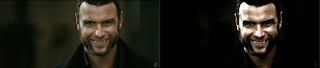
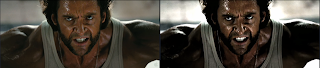
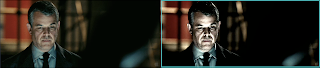

Films like Sin City, No Country for Old Men, O'brother were out thou, City of God, even Australia (there the film of top of my head) have really nice colour grades. I find these really inspiring. Sometimes colours can say more than words.


